Inventory Pickup Delivery Report
Report Parameters
|
Field |
Description |
|---|---|
|
Report Name |
The name of the report. |
|
Start Date |
The start date from when the data must be considered for generating the report. |
|
End Date |
The end date until when the data must be considered for generating the report. |
|
Category |
A list of all available categories for report selection. |
|
Sub Category 1 |
Select the desired subcategory 1 from the drop-down list. |
|
Sub Category 2 |
Select the desired subcategory 2 from the drop-down list. |
|
Sub Category 3 |
Select the desired subcategory 3 from the drop-down list. |
|
Sub Category 4 |
Select the desired subcategory 4 from the drop-down list. |
|
Sub Category 5 |
Select the desired subcategory 5 from the drop-down list. |
Sample Report
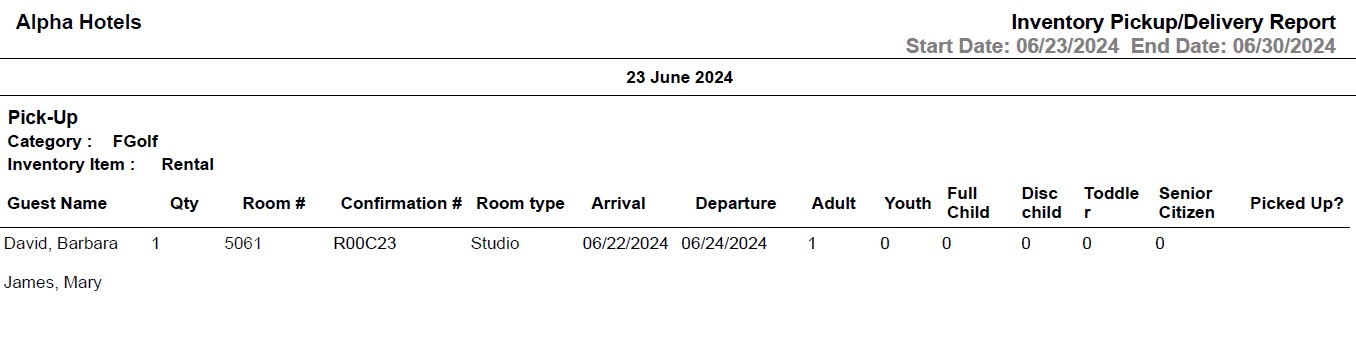
Report Fields
|
Field |
Description |
|---|---|
|
Category |
The category to which the inventory item belongs. |
|
Inventory Item |
The name of the inventory item. |
|
Guest Name |
The last name and first name of the guest added to the reservation. |
|
Qty |
The number of items purchased. |
|
Room # |
The room number of the guest. |
|
Confirmation # |
The confirmation number of the reservation. |
|
Room type |
The room type to which the room number belongs. |
|
Arrival |
The arrival date of the guest. |
|
Departure |
The departure date of the guest. |
|
Adults |
The number of adults on the reservation. |
|
Youth |
The number of youths on the reservation. |
|
Full Child |
The number of children who are not eligible for discount. |
|
Disc Child |
The number of children who are eligible for discount |
|
Toddler |
The number of toddler guests on the reservation. |
|
Senior Citizen |
The number of senior citizens on the reservation. |
|
Delivered? |
Indicates whether the item has been delivered to the guest or not. This column will be displayed only under the Delivery section. |
|
Picked Up? |
Indicates whether the item has been picked up from the guest or not. This column will be displayed only under the Pick-up section. |